Usage
Alarm Pipeline
Add a Notification Block with an Octopush profile in your Alarm Pipeline:
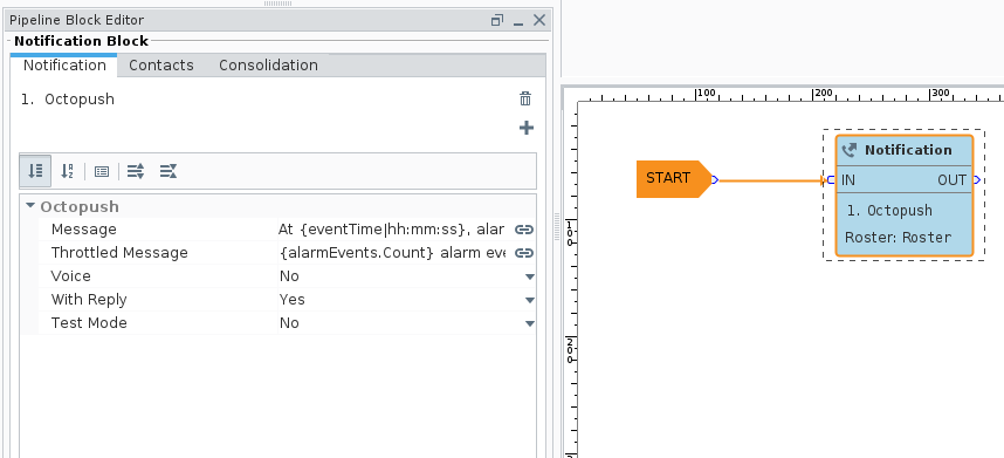
Notification Block Parameters
| Parameter | Type | Default | Description |
|---|---|---|---|
| Message | Expression | See below | Content of the message to send |
| Throttled Message | Expression | See below | Message when multiple alarm events are batched |
| Voice | Boolean | false | Send via Voice SMS instead of text SMS |
| With Reply | Boolean | false | Enable acknowledgment via reply code |
| Test Mode | Boolean | false | Use Octopush simulation mode (no actual delivery) |
Message Templates
Expression Syntax
Message fields support Ignition's expression syntax, allowing dynamic content based on alarm properties.
Default Message:
At {eventTime|hh:mm:ss}, alarm "{name}" at "{displayPath}" transitioned to {eventState}.
Default Throttled Message:
{alarmEvents.Count} alarm events have occurred.
Available Variables
| Variable | Description | Example |
|---|---|---|
{name} | Alarm name | High Temperature |
{displayPath} | Alarm source path | Furnace/Zone1/TempSensor |
{eventTime|format} | Event timestamp with format | {eventTime|hh:mm:ss} |
{eventState} | Alarm state | Active, Cleared, Acknowledged |
{alarmEvents.Count} | Number of throttled events | 5 |
{priority} | Alarm priority | High, Medium, Low |
{label} | Alarm label | Temperature Alarm |
Message Examples
Simple notification:
ALARM: {name} is {eventState} at {eventTime|HH:mm}
Detailed notification:
[{priority}] {name} at {displayPath} - State: {eventState} - Time: {eventTime|yyyy-MM-dd HH:mm:ss}
Throttled events:
ATTENTION: {alarmEvents.Count} alarms require your attention.
SMS Text Notifications
Standard SMS notifications send a text message to all configured recipients in the alarm roster.
Characteristics:
- Maximum message length depends on your Octopush plan
- Sender ID appears as
OperaMetrix - Messages are sent asynchronously
Voice SMS Notifications
When Voice is enabled, the system places an automated phone call instead of sending a text message.
Characteristics:
- Text-to-speech synthesis reads the message
- Language: English (en-GB)
- Voice: Male
- For acknowledgment, the code is repeated and the user enters it via keypad
Voice message with acknowledgment:
Alarm notification. {name} at {displayPath} is {eventState}.
To acknowledge, enter code: {code}. I repeat: {code}.
Acknowledgment Flow
When With Reply is enabled, the module generates a random 5-digit code for alarm acknowledgment.
SMS Acknowledgment
- User receives SMS with the alarm message and acknowledgment code
- User replies to the SMS with only the 5-digit code
- Octopush forwards the reply to Ignition's webhook endpoint
- The alarm is acknowledged in Ignition
Example SMS:
ALARM: High Temperature at Furnace/Zone1 is Active.
Send 48271 to acknowledge.
Voice Acknowledgment
- User receives a phone call with the alarm message
- The system announces the acknowledgment code twice
- User enters the code on their phone keypad before the call ends
- Octopush sends the keypad input to Ignition's webhook endpoint
- The alarm is acknowledged in Ignition
Test Mode
Enable Test Mode to use Octopush's simulation API. Messages are processed but not actually delivered.
Use cases:
- Testing alarm pipeline configuration
- Verifying API credentials are correct
- Development and debugging
- Training new operators
In test mode, the Octopush API validates the request and returns a ticket number, but no SMS or call is made. Check the gateway logs for confirmation.
Audit Logging
When an audit profile is configured in the notification profile settings, all notification events are logged.
Logged information:
- Timestamp
- Recipient (phone number)
- Alarm source and event ID
- Success or failure status
- Ticket number from Octopush
Troubleshooting
| Issue | Possible Cause | Solution |
|---|---|---|
| Notifications not sent | Invalid API credentials | Verify API Login and Key in profile settings |
| Notifications not sent | Network issue | Check connectivity to api.octopush.com |
| Acknowledgment not working | Webhook not configured | Configure callback URL in Octopush |
| Acknowledgment not working | Firewall blocking | Allow inbound traffic from Octopush |
| License expired message | Trial period ended | Contact OperaMetrix for licensing |
Best Practices
- Test first - Always test with Test Mode enabled before going live
- Use throttling - Configure appropriate throttle intervals to avoid message floods
- Enable auditing - Configure an audit profile for troubleshooting and compliance
- International format - Ensure all phone numbers include country codes
- Message length - Keep messages concise, especially for SMS